> For the complete documentation index, see [llms.txt](https://support.paycargo.com/llms.txt). Markdown versions of documentation pages are available by appending `.md` to page URLs; this page is available as [Markdown](https://support.paycargo.com/payments-and-finance/products/paycargo-for-guests.md).
# PayCargo for Guests
### Overview
[**PayCargo Quick Pay**](https://app.paycargo.com/shipAndPay?utm_source=website\&utm_medium=sp-page\&utm_campaign=sp-web) is a guest payment option within the PayCargo platform that allows users to make **credit card payments** to logistics vendors without creating an account. It is designed for companies that make occasional payments and need a simple, secure way to submit them.
Quick Pay supports payments to vendors within the PayCargo network and follows the same secure processing standards used across the platform.
### How it Works
1. **Access PayCargo Quick Pay:** Open the PayCargo Quick Pay portal.
2. **Select the Vendor’s region:** Choose the region where the vendor is located.
3. **Select the Vendor:** Search for the logistics provider by name. Enter the name exactly as it appears on the invoice, as some vendors operate multiple locations.
4. **Enter payment details:** Provide the required reference information, such as:
* Invoice number
* Bill of Lading (BOL) number
* Air Waybill (AWB) number
* Payment amount
5. **Complete the payment:** Enter your contact information and credit card details. Once submitted, a payment receipt is emailed to both the payer and the vendor.
{% @arcade/embed flowId="PDAFsCAWmMXUCYlnkXo7" url="" %}
### Key Benefits:
:check: **No Account Required:** Submit payments without registering for a PayCargo account.
:check: **Timely Cargo Release:** Payments are delivered immediately, often supporting same-day or next-business-day cargo release, depending on the vendor’s setup.
:check: **Broad Vendor Access:** Make payments to more than 5,000 multimodal logistics vendors, including ocean carriers, terminals, and freight forwarders.
:check: **Credit Card Payments Supported:** Payments can be made using Visa, Mastercard, or American Express. Discover cards are not currently accepted.
### Related Questions:
Why can't I find my Vendor on PayCargo Quick Pay?
Some vendors do not accept payments through **PayCargo Quick Pay**. In these cases, payments must be made using a [**PayCargo Payer Account**](/payments-and-finance/products/payer-shipper-account.md).
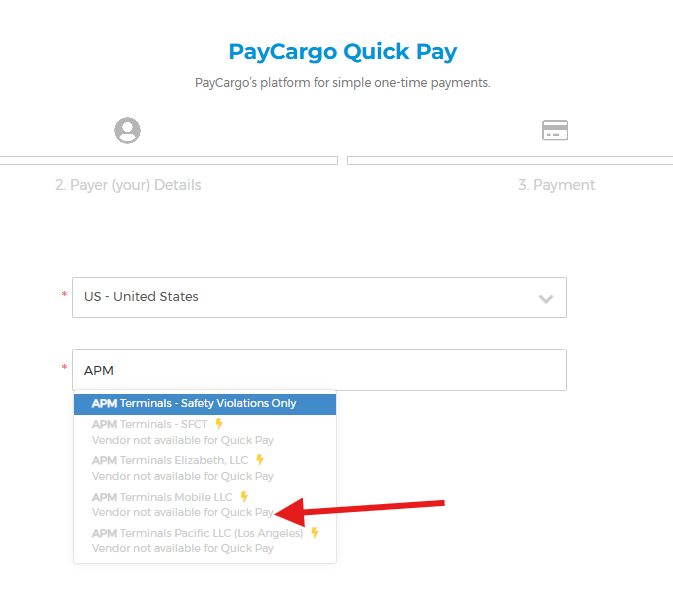
If a vendor is unavailable for PayCargo Quick Pay, the vendor name will appear **grayed out**, along with a message indicating the vendor is not available for guest payments. This applies to certain carriers, terminals, and portal-based payment programs.
If you cannot find the vendor you need, contact the PayCargo Support Team for guidance on available payment options and next steps.
What are my options if a credit card payment fails or is declined?
If a credit card payment fails or is declined, **do not select “Try Again.”** When an error occurs, the transaction remains in a **Created** status until it is resolved.
Contact the PayCargo Support Team as soon as you see a payment error. The team will help identify the reason for the decline and, if needed, void the transaction so you can submit the payment again.
Are there any limits for transactions in PayCargo Quick Pay?
PayCargo Quick Pay generally supports credit card transactions up to $5,000 per payment. This limit applies to individual transactions submitted through the guest payment option.
If your payment exceeds this amount, a [**PayCargo Payer Account** ](/payments-and-finance/products/payer-shipper-account.md)may be required to complete the transaction.
What are the costs associated with PayCargo Quick Pay?
PayCargo Quick Pay transactions are subject to a standard transaction fee of [$19.50 per payment](/pricing/paycargo-cost.md), in addition to a credit card processing fee applied by the card processor.
All applicable fees are calculated at the time of payment and clearly displayed for review before the transaction is submitted.
---
# Agent Instructions
This documentation is published with GitBook. GitBook is the documentation platform designed so that both humans and AI agents can read, navigate, and reason over technical content effectively. Learn more at gitbook.com.
## Querying This Documentation
If you need additional information that is not directly available in this page, you can query the documentation dynamically by asking a question.
Perform an HTTP GET request on the current page URL with the `ask` query parameter, and the optional `goal` query parameter:
```
GET https://support.paycargo.com/payments-and-finance/products/paycargo-for-guests.md?ask=&goal=
```
`ask` is the immediate question: it should be specific, self-contained, and written in natural language.
`goal` is optional and describes the broader end goal you are ultimately trying to accomplish on behalf of the user. GitBook uses it to tailor the answer towards what is most useful for that goal.
The response will contain a direct answer to the question and relevant excerpts and sources from the documentation.
Use this mechanism when the answer is not explicitly present in the current page, you need clarification or additional context, or you want to retrieve related documentation sections.